
The app
- app
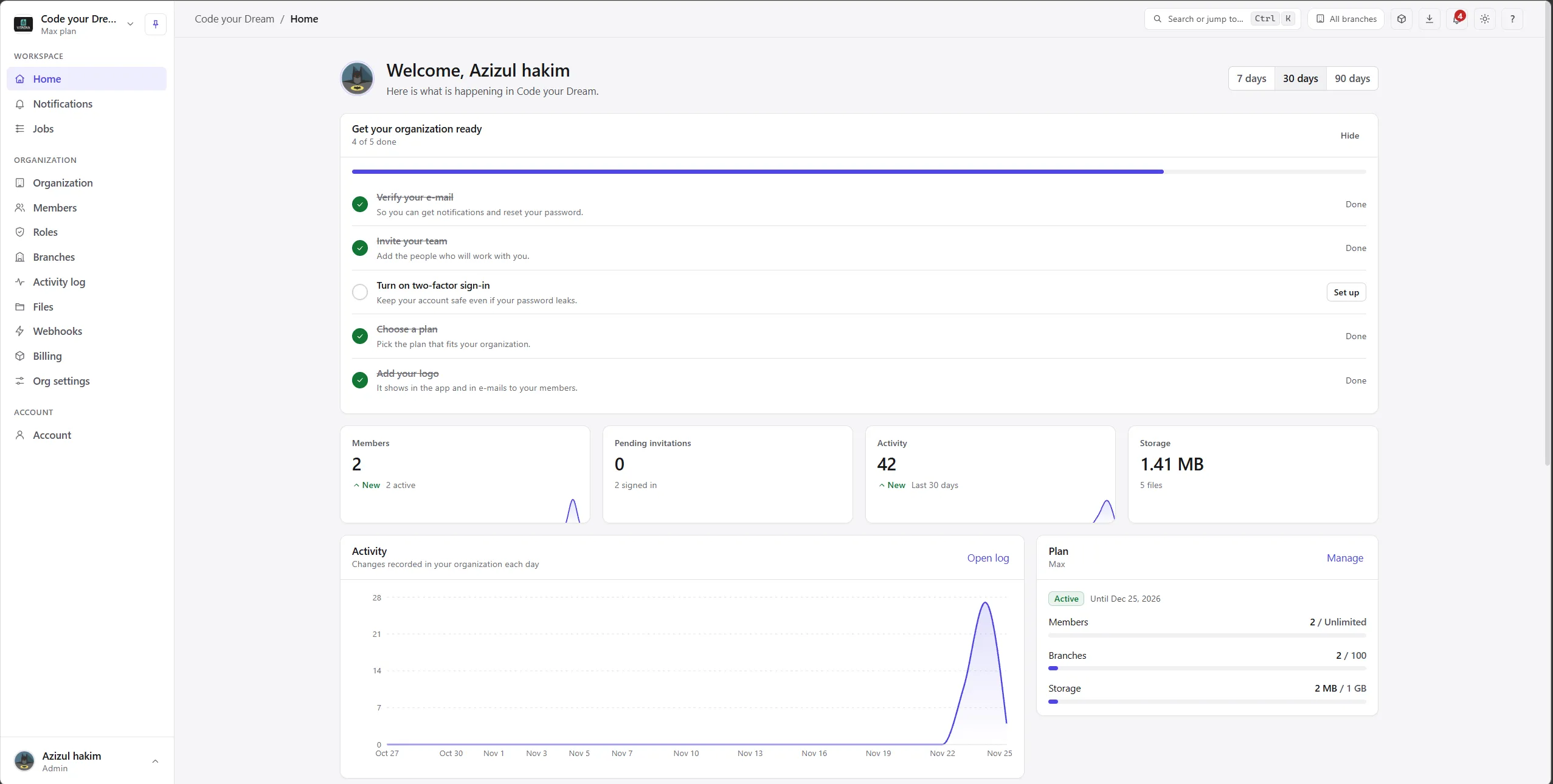
The kit ships a complete web app at /, next to the API. One codebase serves two audiences:
- Organizations (your customers): a workspace per organization with members, roles, branches, billing, files, webhooks and an activity log. See Organization workspace.
- Your staff: a console for every organization on the platform, plans and payment approvals, announcements, feature flags and the system audit log. See Staff console.
Who sees what is decided by the signed-in account: an account that belongs to an organization gets the workspace; a staff account (no organization) gets the console, and can step into any organization from it. Within each, the permissions the API grants decide which pages and buttons appear.
How it is served
| Development | Production | |
|---|---|---|
| Where it runs | Vite dev server on :8082 with hot reload (make dev) |
built into web/app/dist and embedded in the ims binary |
| How it reaches the API | Vite proxies /api, /docs, /storage to the API on :8081 |
same origin: the binary serves the app at / and the API at /api/v1 |
| Build | — | make app-build (the release build runs it) |
The app owns every path except the ones the server reserves (/api, /dev, /docs,
/storage, /mcp, /oauth, /.well-known, /metrics, /up); an unknown path under those is a
JSON 404 from the API, anything else returns the app’s HTML so deep links work. The HTML carries a
strict Content-Security-Policy: the app loads only its own scripts and styles and talks only to
its own origin.
The stack
| Concern | Library | Where |
|---|---|---|
| Routing | TanStack Router, file-based, code-split per route | web/app/src/routes/ |
| Server state | TanStack Query (one retry for network and 5xx errors only) | src/query.ts |
| API calls | a small typed fetch wrapper |
src/api/client.ts |
| API types | generated from api/openapi.yaml by openapi-typescript |
src/api/schema.d.ts |
| Tables, forms | TanStack Table and Form, plus the kit’s own Field, Select, DatePicker |
src/components/ |
| Charts | Recharts, coloured by theme tokens | src/components/charts.tsx |
| Text | a typed catalog per language (English, Bangla) | src/i18n/ |
| Styles | plain CSS on design tokens; no CSS framework | src/styles/ |
React 19, TypeScript and Vite. There is no global state library: the server is the state, and TanStack Query caches it.
How a screen talks to the API
Every call goes through api() in src/api/client.ts:
const branches = useQuery({ queryKey: ['branches', query, page], queryFn: () => api<Page>('/branch', { envelope: true, query: { search: query, page } }),})It adds what every request needs, so screens never do:
Authorization: Bearer …from the stored token, andAccept-Languagefrom the chosen language, so server messages come back translated.- The acting headers (
X-Acting-Tenant,X-Acting-User) while staff are inside an organization or logged in as a user. - An
Idempotency-Keywhen the call passesidempotent: true, so a double-clicked create or payment runs once. - It unwraps
{data: …}(passenvelope: trueto keeplinksandmetafor paging).
Errors arrive as an ApiError with the RFC 9457 fields: status, code, per-field errors for a
422, meta for plan limits on a 402, retryAfter on a 429 and the traceId to quote in a support
ticket. Answers that change the whole app are turned into app-wide events instead: a 401 signs the
user out, TWO_FACTOR_SETUP_REQUIRED opens the setup screen, TENANT_SUSPENDED and
MAINTENANCE_MODE show their status screens.
The token lives in sessionStorage (this tab only) unless the user ticks Keep me signed in,
which uses localStorage. It is never put in a URL.
Signing in and the screens outside the app
Routes outside the signed-in area handle the account lifecycle. Each maps to an API flow described in Authentication and Sign-up:
| Route | Purpose |
|---|---|
/login |
e-mail and password, then a second factor (authenticator app or e-mail code) when it is on |
/signup |
create an organization and its owner account, then the setup wizard |
/onboarding |
the setup wizard: choose a plan, invite your team, protect your account |
/forgot-password, /reset-password |
password recovery by e-mailed link |
/verify-email, /confirm-email-change |
links from verification and e-mail change messages |
/accept-invitation |
an invited member sets a password and joins |
/setup-two-factor |
shown when the organization requires two-factor and the account has none |
/suspended, /maintenance |
status screens for a suspended organization or maintenance mode |
Everything else sits under the _app layout route (routes/_app.tsx), which loads the session
(profile and permissions) before any page renders, so a page can rely on useSession().
Throughout the app
- Ctrl+K opens a palette of every page and action you can reach;
gfollowed by a page’s letter jumps to it,?lists every shortcut. - Appearance per browser: light, dark or system theme; five accent presets (indigo, blue, teal, violet, slate); comfortable or compact density.
- Language: English and Bangla, switched from the account menu. See Translations and theming.
- Live updates: when the API’s realtime stream is on, notifications, jobs and announcements arrive as they happen; otherwise screens poll. See Live updates, which also shows how to give your own feature live updates.
- Background jobs: exports and imports run in the queue; a tray in the top bar shows their progress and a download link when they finish.
- Phone layouts: the sidebar collapses to a drawer and tables scroll inside their card.
Where the code lives
web/app/├─ src/│ ├─ api/ client.ts (the fetch wrapper) · schema.d.ts (generated)│ ├─ auth/ session.ts: sign-in, the session query, can()│ ├─ components/ the shell, navigation.ts, ui.tsx, form.tsx, charts.tsx, …│ ├─ i18n/ en.ts (reference) · bn.ts · index.ts│ ├─ routes/ one file per screen; routeTree.gen.ts is generated│ └─ styles/ tokens.css · base.css · components.css · screens/├─ embed.go embeds dist/ in the Go binary└─ package.json dev · build · typecheck · check:style · openapi:genReady to build one? Adding a screen walks through it, and the first-module tutorial gives its products module a screen.


Built and maintained by Innovix Matrix System
A software studio building custom software, web platforms and mobile apps. We use this kit for our own products, and we can help you ship yours on it.
© 2026 Innovix Matrix System. IMS Go SaaS Kit v0.2.0.